
Make more.
Manage less.
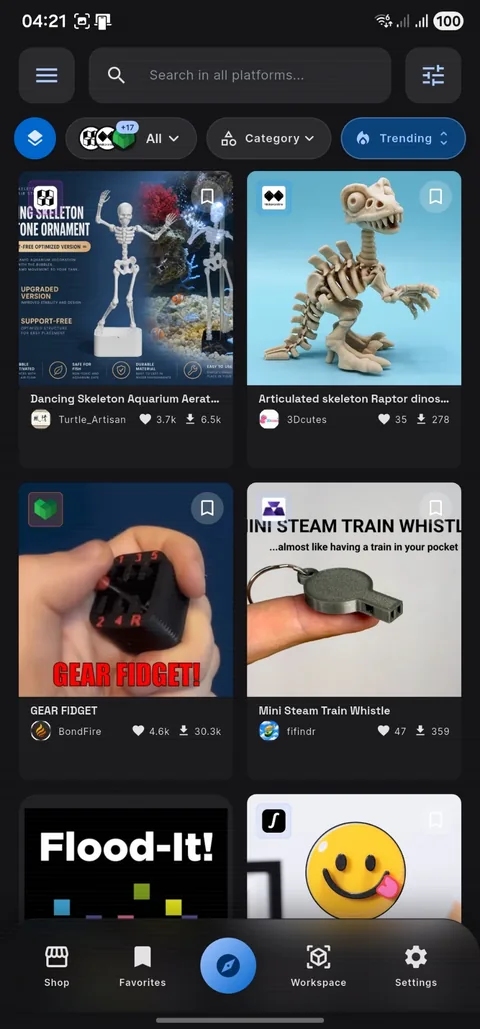
Discover models across the web, prepare files, control compatible printers, and keep your making workflow together—right from your phone.
 MakerWorld1.2M+
 Printables850K+
 Thingiverse2.5M+
 Cults3D900K+
 Thangs2M+
 MyMiniFactory350K+
 Sketchfab1.5M+
 CGTrader1.8M+
 Creality Cloud600K+
 Snapmaker100K+
 Pinshape80K+
 GrabCAD5M+ CAD
 FAB365Foldable
 MakerOnlineAnycubic
 DIY3DMaker
 MakeItRealDesignMakerWorld1.2M+Printables850K+Thingiverse2.5M+Cults3D900K+Thangs2M+MyMiniFactory350K+Sketchfab1.5M+CGTrader1.8M+Creality Cloud600K+Snapmaker100K+Pinshape80K+GrabCAD5M+ CADFAB365FoldableMakerOnlineAnycubicDIY3DMakerMakeItRealDesign
From inspiration to a finished print.
MakerSpell connects the scattered parts of a 3D printing workflow without taking control away from the maker.
Discover across platforms
Search multiple 3D model communities and marketplaces from one focused interface.
Preview locally
Open common model and print files on your device before committing to a download or print.
Prepare for printing
Inspect, organize, and prepare supported files with mobile tools designed around real printing workflows.
Control your printer
Connect supported printers, monitor jobs, and reach essential controls without changing apps.
Keep files in sync
Optionally back up selected downloads and project files to your own Google Drive.
Grow your shop
Prepare licensed models and your own creations for supported commerce workflows with clearer organization.
Less app-switching. More making.
Move through the work in a natural sequence while MakerSpell keeps the important context close.
Find
Search and compare models from supported sources.
Prepare
Review files, dimensions, print information, and licensing context.
Print or publish
Continue to your connected printer or supported shop workflow.
Find it. Open it. Slice it. Send it.
See MakerSpell move from multi-platform model discovery to on-device preparation, native slicing and compatible network-printer control in one continuous Android workflow.
Know what works before you install.
MakerSpell combines broad profile support with device-specific network features. Slicing support and direct printer control are separate capabilities.
Android devices
Android 7.0 or newer on a 64-bit ARM device. Android 11 or newer and sufficient free storage are recommended for native slicing.
Printers and protocols
Profiles cover many printer brands. Direct discovery, upload, monitoring and control vary by model, firmware and protocol, including supported Creality, Snapmaker and common network-print workflows.
Files and commerce
Open STL, 3MF and OBJ workflows. Supported Shop connections currently include Trendyol, Shopify and WooCommerce; availability may depend on plan and region.
MakerSpell is independent from the named manufacturers and platforms. Features can vary by source, firmware, device, account, region and subscription.
Ask about your device3D Printing Ecosystem Partners
Special offers, high-speed filaments, laser cutters, and trusted 3D printing equipment curated for our maker community.

High-speed PLA+, PETG, and FilaDryer filament drying systems with 4% discount.

X1, P1, and A1 series high-speed multicolor printers with automatic material systems.

K1 Max, Ender 3 V3, CR-Scan 3D scanners, and Falcon laser engravers.
Industry standard eSUN PLA+, ePLA-Matte, PETG, TPU, and fast-speed filaments.

Eco-friendly PolyTerra, rich aesthetic finishes, and engineering grade materials.
Panda Touch for Bambu Lab, CryoGrip build plates, SKR boards, and Klipper screens.

Q1 Pro, Plus4, and X-Max 3 high-speed enclosed 3D printers with actively heated chambers.
High-precision TTS/TS2 series laser engravers and TTC 450 desktop CNC routers.

Kobra 3 Combo multicolor FDM printers and Photon high-precision SLA resin printers.

Mars & Saturn 4 Ultra 12K resin printers and Centauri Carbon high-speed CoreXY.
Mesmerizing dual & triple color Silk PLA, matte, and high-speed engineering filaments.
High-speed PLA+, PETG, and FilaDryer filament drying systems with 4% discount.
X1, P1, and A1 series high-speed multicolor printers with automatic material systems.
K1 Max, Ender 3 V3, CR-Scan 3D scanners, and Falcon laser engravers.
Industry standard eSUN PLA+, ePLA-Matte, PETG, TPU, and fast-speed filaments.
Eco-friendly PolyTerra, rich aesthetic finishes, and engineering grade materials.
Panda Touch for Bambu Lab, CryoGrip build plates, SKR boards, and Klipper screens.
Q1 Pro, Plus4, and X-Max 3 high-speed enclosed 3D printers with actively heated chambers.
High-precision TTS/TS2 series laser engravers and TTC 450 desktop CNC routers.
Kobra 3 Combo multicolor FDM printers and Photon high-precision SLA resin printers.
Mars & Saturn 4 Ultra 12K resin printers and Centauri Carbon high-speed CoreXY.
Mesmerizing dual & triple color Silk PLA, matte, and high-speed engineering filaments.
Frequently Asked Questions
Everything you need to know about MakerSpell, slicing workflows, and ecosystem compatibility.
Your next print can start on your phone.
Join the Google Play open test, complete a real workflow and tell us which device and printer you used.