
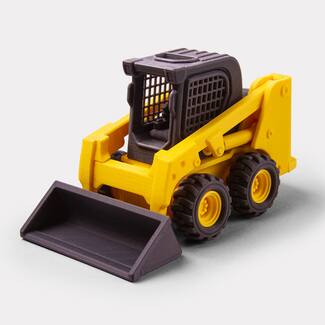
Model Overview & Print Notes
The previously made excavator has gained great popularity from customers. So I wanted to design more heavy equipment, so I designed the skid loader this time. Again, all movements have been reproduced. The making process is as follows. 1. Fold the lower body and fit the tire. 2. Sliding the engine through it, then inserting it into the cockpit. 3. Glue the grate windows. 4. Pull the cylinder of the lift arm until it clicks into place. 5. Rotate the piston and fit it into the lift arm. And put this piston in the cylinder. 6. Connect the safety tread between the lift arms. 7. Connect the bucket to the lift arm. 8. Connect the lower body to the lift arm and connect the cockpit + engine parts to complete. We hope you love this skid loader a lot, and look forward to the heavy equipment that will be introduced in the future! Designed by GOODesign. 1: 35 Scale Largest part in printing, size = X 42mm, Y 102mm, Z 24mm, After full assembly size= X 52mm, Y 100mm, Z 57mm




💬Fab365 Community Comments(...)
★Fab365 Original Reviews