
1/4
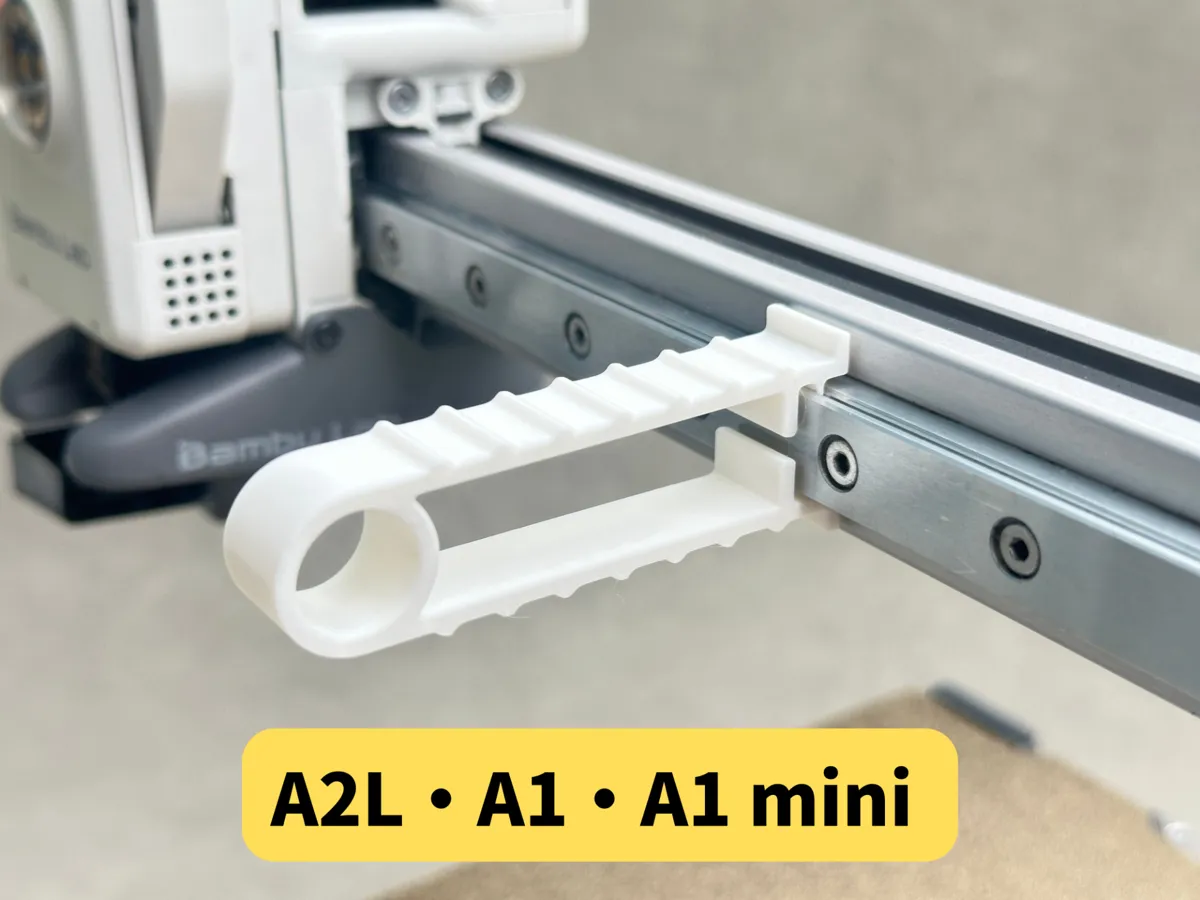
Model Overview & Print Notes
Keep the X and Z axes of your Bambu Lab A1, A1 mini, or A2L clean with this simple clip-on cleaning tool.
Insert a piece of tissue, cleaning wipe, felt, or soft cloth into the tool, then slide it along the axis to remove dust, dirt, and old residue. The textured handle provides a secure grip, while the clip-on shape helps keep the cleaning material in place during use.
A small amount of suitable lubricant can also be applied to the cloth when performing regular printer maintenance.
Features
- Designed for cleaning the X and Z axes
- Compatible with A1, A1 mini, and A2L
- Easy clip-on design
- Holds tissue, cleaning wipes, felt, or soft cloth
- Comfortable textured grip
- Compact and reusable
- No assembly required
- Prints without supports
Regular cleaning helps reduce dirt buildup and keeps the axes moving smoothly.
Note: Turn off the printer before cleaning. Use only cleaning products and lubricants recommended for your printer.




💬MakerWorld Community Comments(42)
★MakerWorld Original Reviews