
1/10
Model Overview & Print Notes
Summary
Thanks for getting this verified!
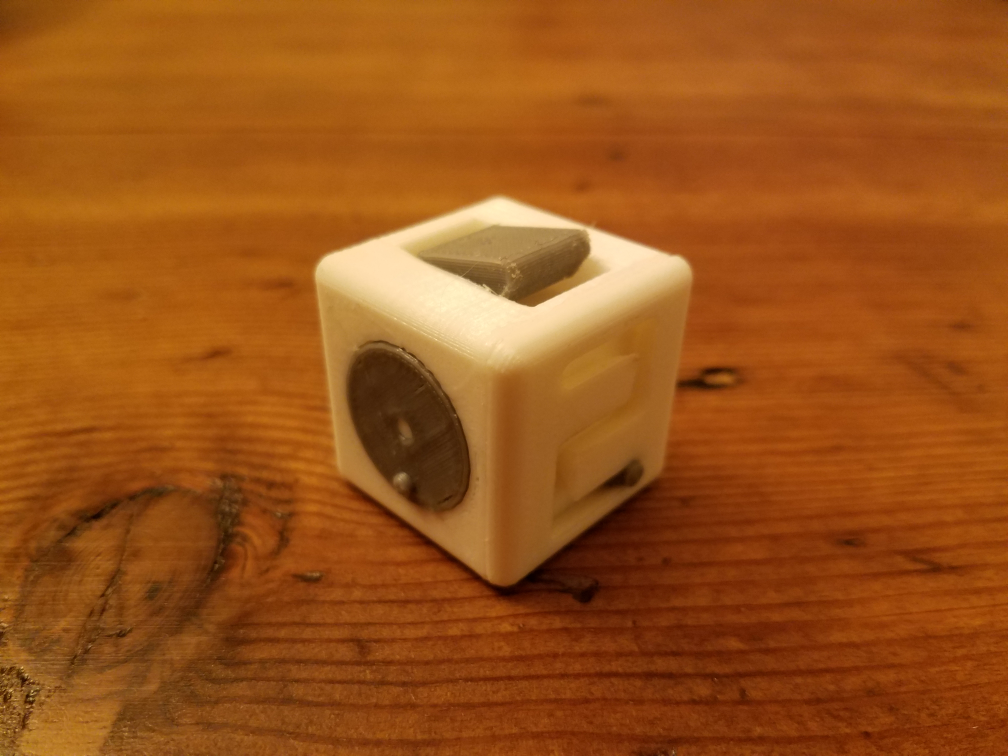
Ever feel nervous, stressed, or even bored? Well then the fidget cube is for you!
The fidget cube is a light-weight, portable cube with moving parts. It helps calm your senses and breathe.
Features of the Fidget Cube:
- Spinning Circle
- Moving Switch
- Finger Maze
- Finger Indention
- Tunnel
Recommendations:
- Make sure your printer can do bridges/overhangs fairly well.
- Use 2 different colors.
- Lube the spinning circle. (NOT REQUIRED TO SPIN)
- If the piece is showing up really tiny in the slicer scale it by 100x or 1000x. For some reason slicers are getting this wrong!
Updates:
1/10/17
- Verified
11/9/16
- Added .ipt file (Autodesk Inventor File)
11/2/16
- Changed smooth lines to finger maze
- Fixed switch to make it stay on better
- Made it more printer-friendly
- Separated block and pieces
- Scaled .stl file to correct size
10/25/16
- Scaled .stl file to correct size
10/23/16
- Fixed switch to make it stay on better
- Made finger indention a little bit deeper
COULD BE CHANGES IN THE FUTURE
Print Settings
Printer Brand:
Robo 3D
<p class="detail-setting printer"><strong>Printer: </strong> <div><p>R1 ABS + PLA Model</p></div></p> <p class="detail-setting rafts"><strong>Rafts: </strong> <div><p>Doesn't Matter</p></div></p> <p class="detail-setting supports"><strong>Supports: </strong> <div><p>No</p></div></p> <p class="detail-setting resolution"><strong>Resolution: </strong> <div><p>0.01 mm</p></div></p> <p class="detail-setting infill"><strong>Infill: </strong> <div><p>0.25%</p></div></p> <br> <p class="detail-setting notes"><strong>Notes: </strong> </p><div><p>Make sure your printer can do overhangs and bridges fairly well. I would also recommend printing in two separate colors.</p></div>How I Designed This
I used Autodesk Inventor Pro 2017 to design this.






💬Thingiverse Community Comments(49)
★Thingiverse Original Reviews