
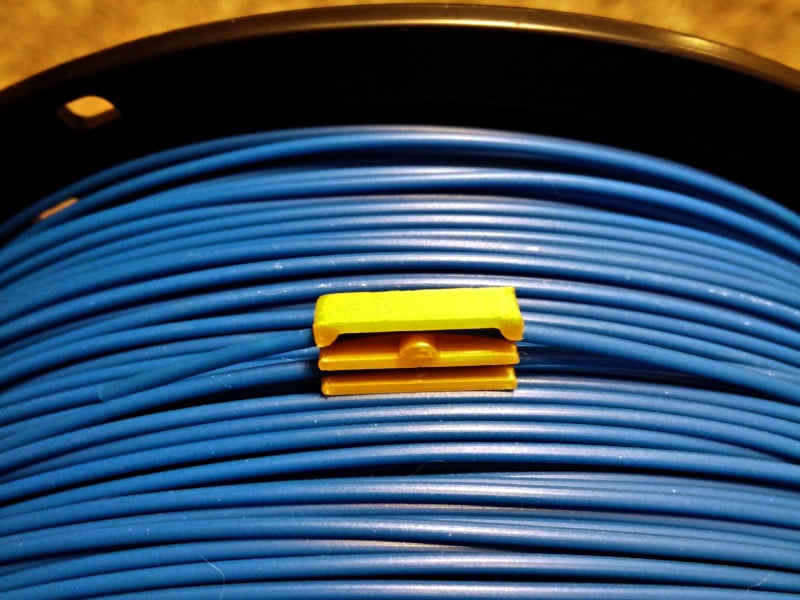
Model Overview & Print Notes
Summary
WARNING: I DO NOT RECOMMEND USING THESE CLIPS WITH BRITTLE FILAMENTS SUCH AS PLA. Use a stress-free clip instead. Although they seemed to work great, I have discovered that after a few months with the clip in the same place the tiny amount of stress from the curvature in the clip causes sufficient strain on my PLA filaments to break them! My filaments are old, stale and in a cold basement, so those may have been contributing factors, but I cannot assume with any confidence that this won't also be problem in a warmer environment with fresher filaments. My apologies to anyone who has used them and run into the same problem.
Any other clip designs that stress the filament even just a tiny amount will have the same problem. I also have had filaments break even when using stress-free clips, but I want to minimize that risk, so I'm now using the stress-free Universal Dual-Filament Dragon Clips. If you want a good stress-free clip that doesn't clip to the spool, try the tight version of the Filament clip by motoz.
These are the features of this clip:
- Uses absolutely minimal material! Uses as little as 0.14 m.
- Prints extremely fast!
No other filament clip prints as fast.See "Is it really the best?" section below. - Clips onto filament very easily! It doesn't get any easier.
- Provides superior gripping performance! Guaranteed to not slip.
- Doesn't clip onto the spool! Works with all spools.
- Design is inherently tolerant of print inaccuracies.
- Customizable! It's perfect already, but if you disagree or you have a wildly inaccurate printer, you can tweak the parameters.
If you think I'm exaggerating, print one out and try it. It takes only a few minutes.
Running the Customizer
Thingiverse hadn't run their customizer queue from Jul 10, 2020 to Aug 4, 2022 and may stop running it at any time again, so if they don't process your customized job, you will have to install and run OpenSCAD (free software) on your own computer to process the code to create your own customized models. See DrLex's instructions linked below for further details.
How to Run Customizer on Your Own Computer
Why another clip?
The filament clips that I had been using for years slipped when used with a different brand of filament that I recently started using. So I went searching for the best filament clip on Thingiverse. I found the best design but I didn't like how massive it was and that it was going to take 22 minutes to print. Ain't nobody got time for that!
So I made my own. It's designed very similar to Yet Another Filament Clip but I placed the nubs in the curved-path channel on the opposite sides so that the filament is arced in the same direction as on the spool and the stress on the filament is reduced. Most importantly, my design is less than a fourth the mass and takes less than a third of the time to print!
1.75 mm Filament Clip & 3 mm Filament Clip
I've included a clip for 1.75 mm filament and one for 2.85 mm filament (aka 3 mm filament), and there is a customizer if you think the model needs tweaking. The clips for the 2.85 mm filament are untested and may need to be adjusted. The parameters used to generate it were extrapolated from the measurements used in the 1.75 mm clip.
The parameters used to create the 2.85 mm clip are:
"2.85mm filament": { "baseThickness": "1.2", "channel_height": "4.35", "clipLength": "22", "grabChannelWidth": "5.7", "nubBottomRadius": "2.45", "nubTopRadius": "2.85", "straightChannelWidth": "3.1", "wall_width": "1.2" }The parameters used to create the 1.75 mm clip are the program defaults.
"design default values": { "baseThickness": "0.8", "channel_height": "3.25", "clipLength": "18", "grabChannelWidth": "3.5", "nubBottomRadius": "1.5", "nubTopRadius": "1.75", "straightChannelWidth": "2", "wall_width": "0.8" }Update 2019-04-26: V1.2
Michael Greene created a remix that has chamfers to strengthen the interface between the walls and the base. This is a really good idea, but his code relies on external code to create the chamfers. I prefer fillets instead of chamfers so I updated my code to create the fillets, which doesn't rely on any external code. Besides being a little bit stronger, the updated version seems to grab the filament slightly better.
Is it really the best?
I had asked in the comments for links to any better clips and Anders Nyland linked a filament clip that he designed and is a valid contender for "best clip". His design uses the same minimal amount of material but it prints faster. It doesn't provide the same gripping performance as my design, but it's probably adequate and it doesn't stress the filament at all, whereas my design curves the filament a bit to grip it. I still think my design is better, but I wouldn't argue with you if you think his is. Print them both and compare them.
Technical note:
If you generate your own clip(s), you may notice that the dimensions aren't exactly as you specified. That's because the wall widths have been adjusted to be 0.4051 mm for every 0.4 mm. This is done because Cura will not always slice as expected unless this adjustment is made. I've learned from creating the many pictograms in my 49 Room Signs Like "The Office" logo that precision crafting is an important part of designing 3D models whenever the models have areas that are only 1 to 3 nozzle widths wide. And that's the scale of precision required: 1 ten-thousandths of a mm!
 Some of My Designs
Click an image below (opens in a new tab) or go to my designs page and see them all.
If you see some thing that you like  , please click the
 Like button and turn that heart red
 .


💬Thingiverse Community Comments(20)
★Thingiverse Original Reviews