
Model Overview & Print Notes
Summary
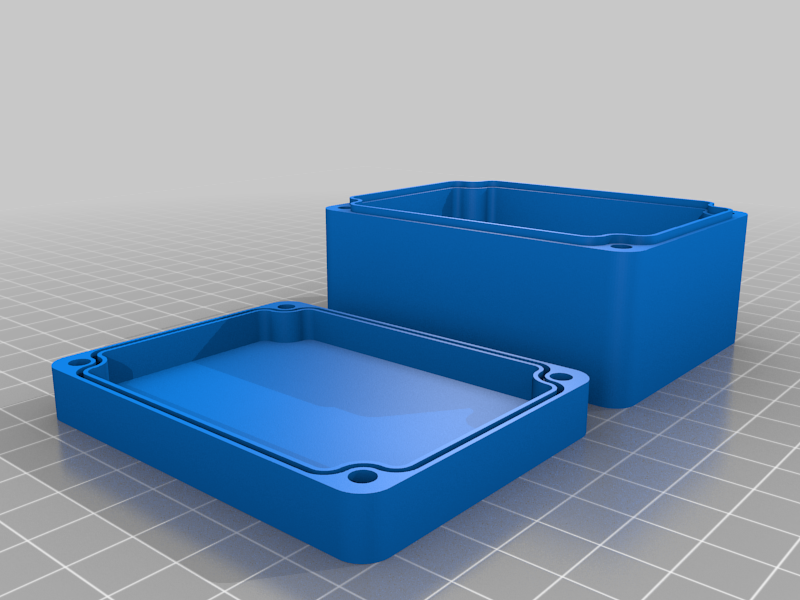
Stable and waterproof / watertight OpenSCAD customizer case / box / enclosure V6.1 by pbtec
Edit December 2022: Updated Version 6.1 --> Seems Openscad has in certain circumstances problem with special characters (like ä) in comments…. Created new fixed version 6.1 (Nothing else has changed)
I moved my things to the website from the Orange Printer reseller. You can find the newest Version 7.4, and other customizable case box enclosure housing there. Follow the link on my website https://pb-tec.ch/2021/08/01/stable-and-waterproof-openscad-case-by-pbtec/
Highly scalable electronic case for 3D printing. Try it out!
Optimized for Openscad Customizer. Activate it under view/customizer and play around ;-)
You don't know Openscad? No problem. Export the stl file from Openscad (F6 then F7). Then Import the stl file into your best known 3d program to make holes for example.
You can also make the holes afterwards with the drilling machine.
No support needed to print
Additional Screws (M2,M2.5,M3,M4 or M5), the matching nuts (hex or square) needed.
If you want to protect your electronics from humidity also “silicone sealing cord” is needed. Available at AliExpress or ebay.
For waterproof cases you can use silicone sealing cord with diameters from 1 to 3mm
To use also without sealing cord. The groove and ridge gives the housing a high stability and tightness.
Use of regular nuts or square nuts
Define outer vertical radius of corners
Echo output in console shows inner and outer size and more
Echo output shows the needed length of the screws
Use screws from m2 up to m5
Default are 4 screws at each corner. For large cases add addtional ones in the middle of both x and y sides if needed
Use several predefined wall mount holder, some with multiple mounting holes (up to 3)
Important!
If you use standard nuts you need to pause the printer a certain level to insert the nuts
If you need a stable and waterproof case please print with 100% infill
I'm aware that sometimes, when using too big or too small parameters, there are some rendering issues. To prevent such issues change only one parameter at once and check the result.
I never tested the water proofness of this case. For more information see https://blog.prusaprinters.org/watertight-3d-printing-part-2_53638/
pbtec / pb-tec.ch
For Projects with ESP32, ESP8266, Arduino, Raspberry, Sonoff, Shelly, IoBroker, IoT. In- and outdoor :-)
Let me see your prints, and remakes and pls don't forget to like this print
use https://paypal.me/pbtec if you want to spend me a coold beer. Thanks in advance :-)
Some tags to better find this thing:
Electrical Junction, Distribution box, Connection box, Cable Branch box, Electronic, Housing, ip67, DIY, Project Box, Instrument Case, Wiring socket box, Sealed, Cable gland, shell, weatherproof, outdoor, airtight, watertight, dustproof, electronic, PCB, airproof, sturdy rugged, enclosure
Print Settings
Printer Brand:
Prusa
<p class="detail-setting printer"><strong>Printer: </strong> <div><p>I3 MK3S</p></div></p> <p class="detail-setting rafts"><strong>Rafts: </strong> <div><p>No</p></div></p> <p class="detail-setting supports"><strong>Supports: </strong> <div><p>No</p></div></p>


💬Thingiverse Community Comments(15)
★Thingiverse Original Reviews