
Model Overview & Print Notes
Summary
Update I found a problem with the Fusion model. When the length was increased it did not always regenerate the model correctly. This has now been fixed.
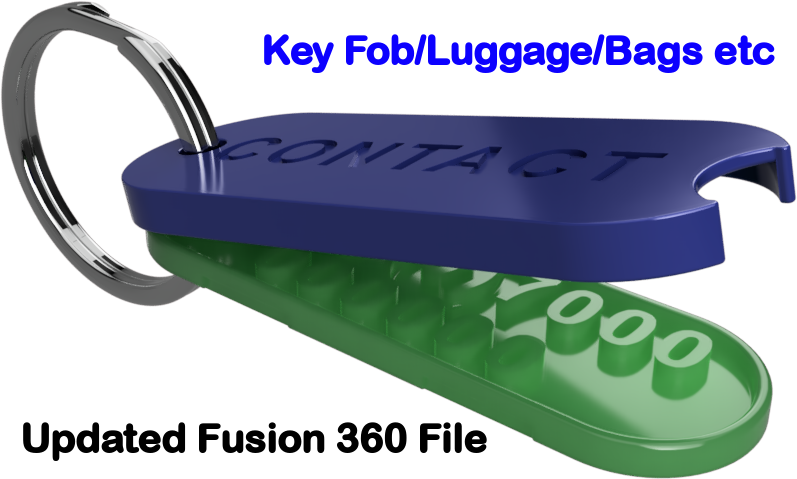
Key Fob/Luggage/ Bag Tag - add your mobile/cell number which can then be attached to your keys or Luggage. The cover clips over the top of the number so that it cannot be casually looked at. The cover is meant to be quite a firm press fit, for obvious reasons.
I designed this in 2022 and have been testing since, on keys bags etc. I gave them a Christmas presents to quite a few family members in 2022 and most are still using them on their keys.
Hopefully anyone finding lost keys/luggage will be honest and return them.
It can be printed in either a single colour or two or more colours. The easiest way to print in two colours so the number stands out is to cut the model in your slicer +1.52 mm on the Z Axis and then set the colour of the numbers and possible the surrounding border.
I have printed in PLA and PETG and even the PLA ones have lasted over 3 years now. But no guarantees!
You will need to use Fusion 360 to create your first Key Tag.
There are 4 parameters.
NUMBER
LENGTH
COVER_CLEARANCE
COVER_WORD
Open the f3d file in Fusion 360 in Design and Solid, click Modify and "Change Parameters" (or Control/Command + Q). Under favourites you will fine the 4 user parameters
Change the number and make sure the it has the single quotes and click OK. The model will be regenerated.
I suggest that you keep the number in the international i.e. +44 (your own country code) format.
Hide the cover in the menu and check the number. At this point there could be a issue. If you counties number is shorter or longer than the UK number it was designed for you may need to modify the LENGTH parameter. The cover and the fob will be resized to fit together.
You may also wish to change the word on the Cover, currently "CONTACT". I suggest that you keep it all in Capitals, just prints clearer.
The next issue you may have is cover fit. This can be different for each material and your printer. The only way of checking is to print out your first Key Bob and cover. The id Cover is too tight increase the COVER_CLEARANCE the amount you change this is doubled as the clearance is all around between the cover and the fob. It is limited to a maximum of 0.3mm. If it is too loose (unlikely) the COVER_CLEARANCE can be reduced to 0.01mm minimum.
You will need to hide the keyring in Fusion, it won't print very well.
If you need just a name tag https://www.thingiverse.com/thing:7289306
If you like the design and would like to give me a small reward then it would be really appreciated. Thanks






💬Thingiverse Community Comments(1)
★Thingiverse Original Reviews